Your SketchUp model, laser‑ready in minutes.
Click the walls and slabs you want. LaserFold keeps the real scale, reads the wall thickness, trims the joints, adds kerf for your material, and nests everything on your sheets as clean PDF, DXF and SVG.
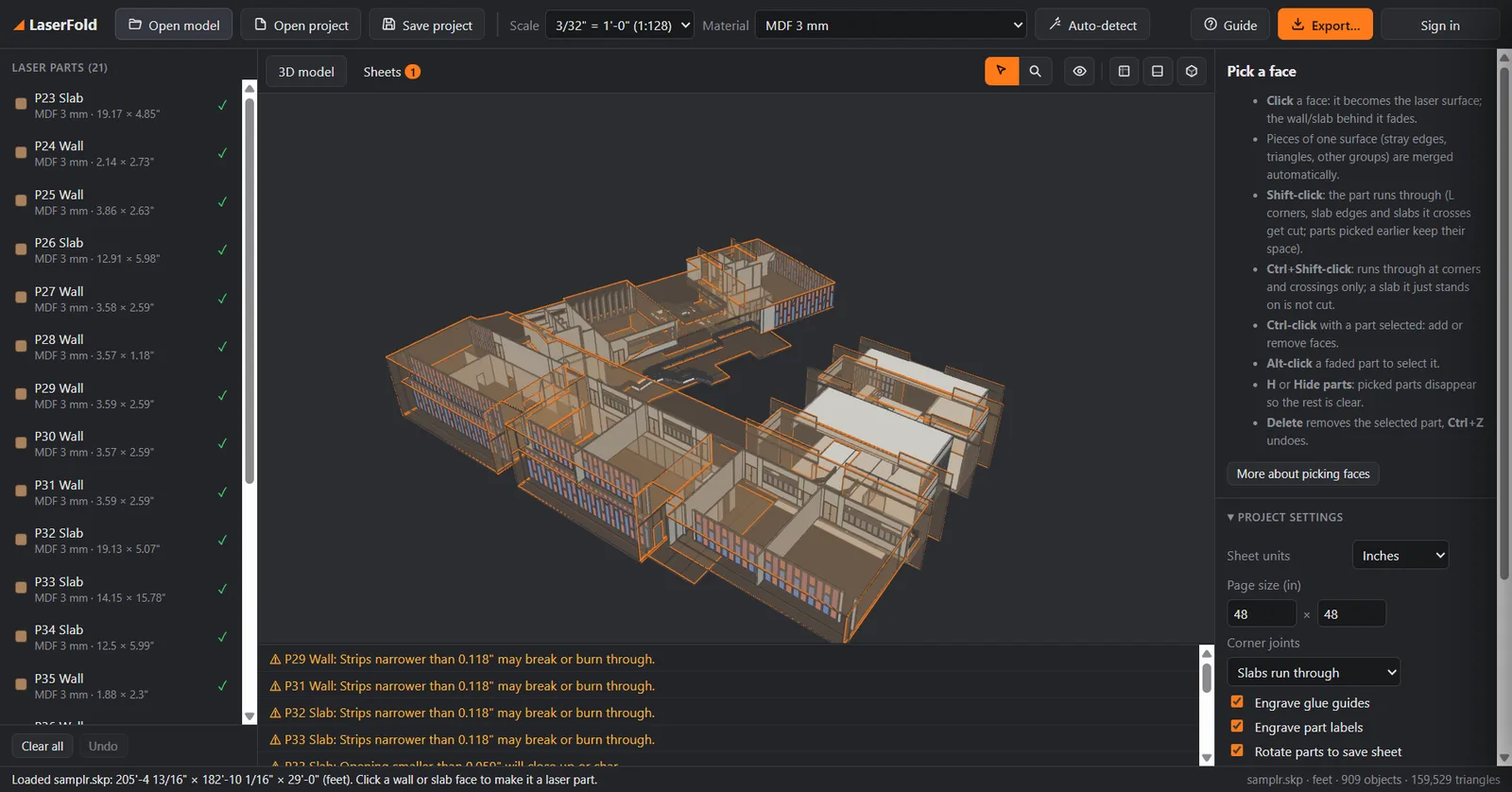
Stop redrawing your model in CAD the night before submission
Exporting from SketchUp gives you broken lines, duplicate edges and the wrong wall thickness. Cleaning that up by hand takes hours, for every model.
The usual way
- Export elevations and plans from SketchUp or Rhino
- Join hundreds of broken segments, delete duplicates
- Shorten walls at every corner so the thickness fits
- Guess the kerf and offset every outline
- Arrange parts on the sheet by hand
- Plot each sheet to PDF, then repeat after every design change
With LaserFold
- Open the .skp file as it is
- Click each wall or slab face you want cut
- Pick your material and scale
- Export every sheet at once, ready for the laser
- Changed the design? Open the new model and click Export again
Three steps from model to cutting bed
Open your model, true to size
Drop a SketchUp file straight in: groups, components and hidden layers are handled, and units come out exact. OBJ, STL, GLB and other formats ask you to confirm the units, showing the real size of the building.
Click a face, get a part
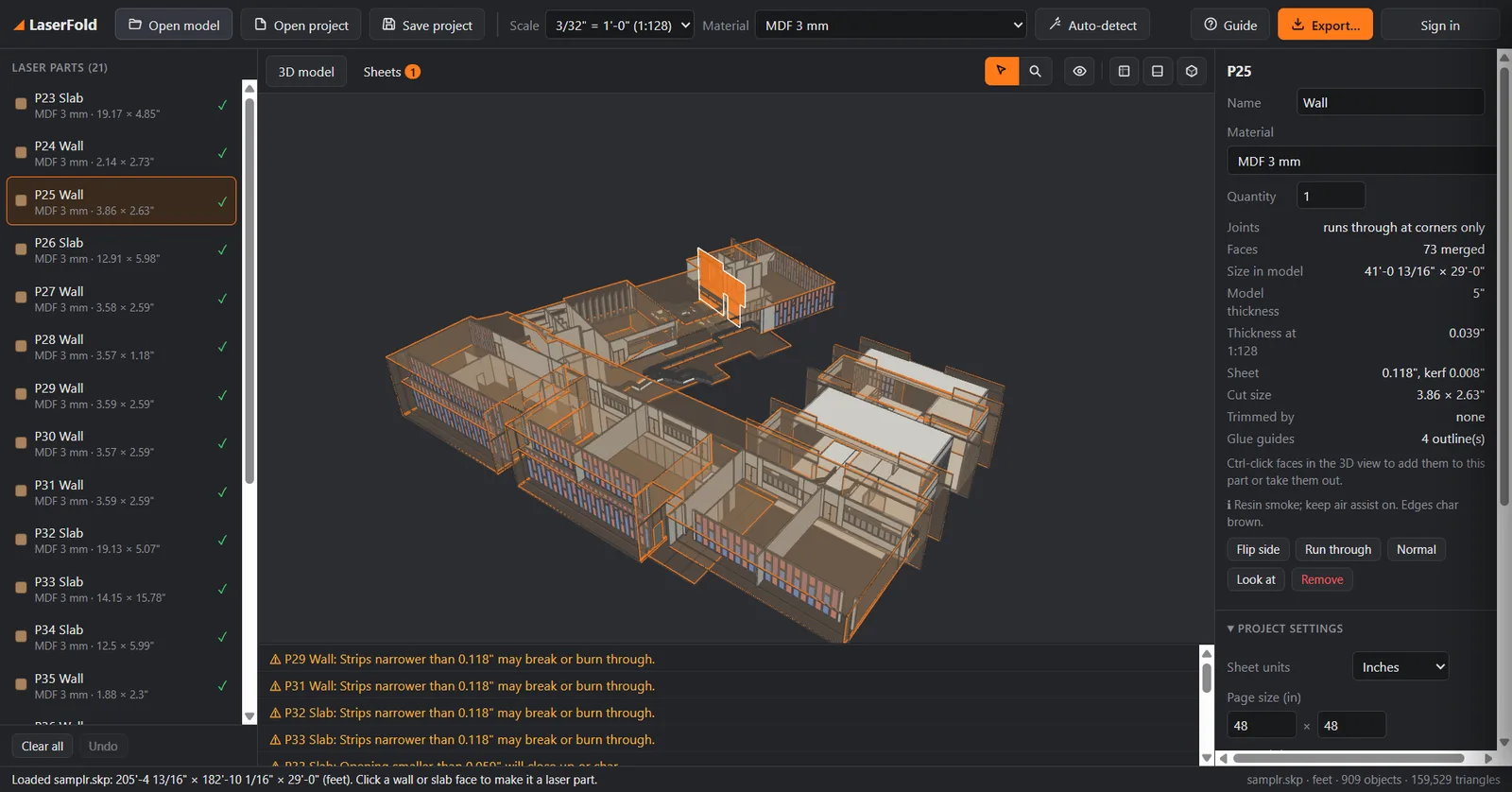
The face you click becomes the laser surface. LaserFold finds the face behind it to measure the wall or slab thickness, then fades the whole solid so you can see what is left to pick.
- Warns when 250 mm walls at 1:100 don't match your 3 mm board
- Fills the slots walls leave in a slab's top face
- Auto-detect finds every part of a given thickness
Nest, check, export
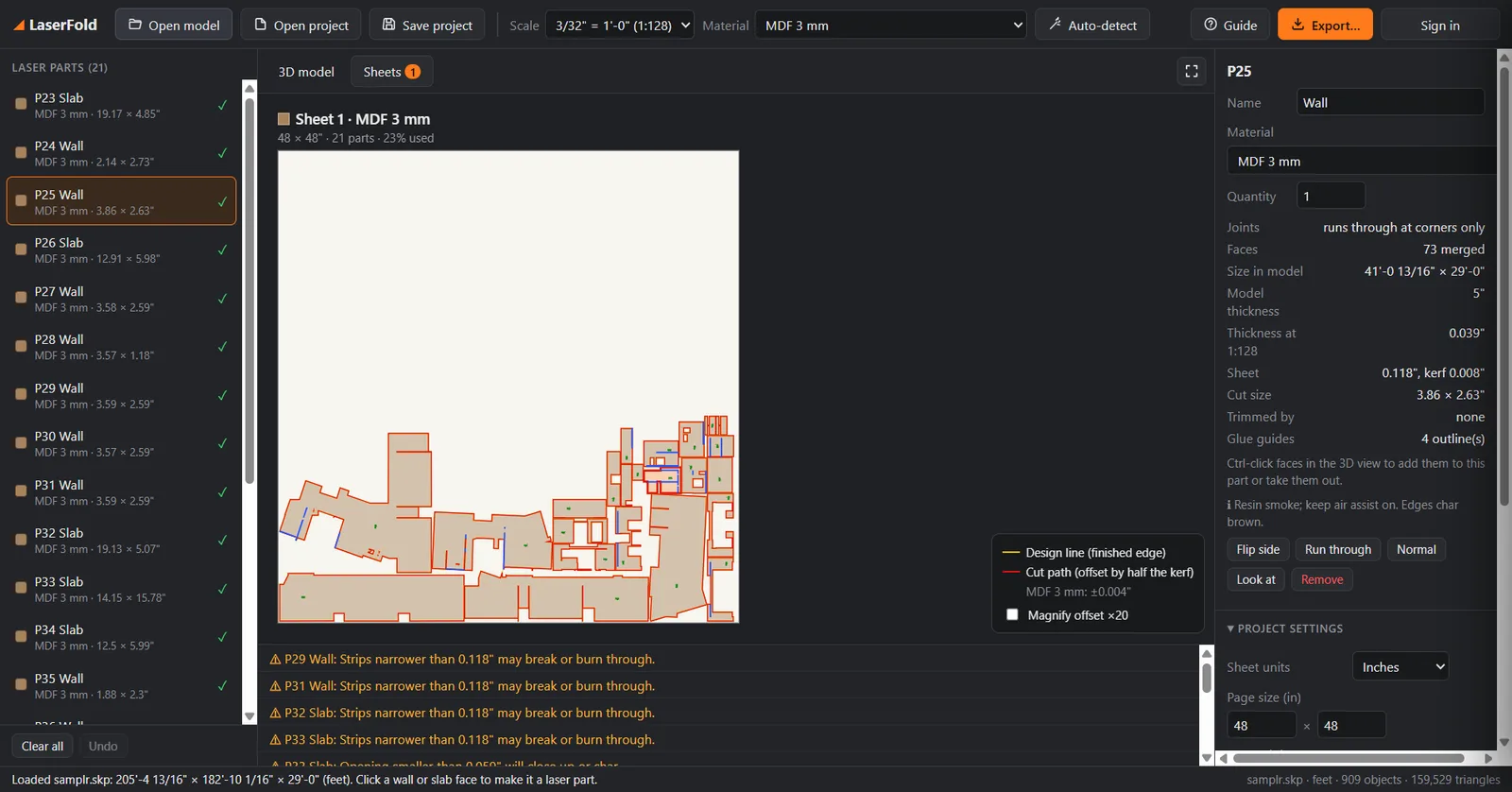
Parts are laid out on your sheet size, with small parts placed inside window openings. Every part gets a label, every slab gets glue guides, and any strip that is too thin to survive is flagged before you waste a board.
It understands your model the way a model maker does
Walls, slabs and corners are not just faces. LaserFold reads them as solids, so every click gives you a part that actually fits.
You decide how parts meet
The same two walls, picked three ways. Every pick shows a preview first: the model turns x-ray, the new part glows, and anything it would cut glows red. Press Enter to confirm.
Click the face, it finds the thickness
The face you click is the side the laser engraves. LaserFold finds the face behind it, measures the wall, and checks that your board matches at your scale before you cut a thing.
Broken faces become one part
SketchUp splits big faces into pieces and triangles. LaserFold sees one flat surface and gives you one clean outline: no joining lines, no duplicate edges.
What's cut is gone
Every part you pick fades out of the model by its real volume, whatever groups it was drawn in. You always see what's left, nothing gets cut twice, and space one part has taken is never given to another.
Your units, your scale
Feet and inches stay feet and inches; millimetres stay millimetres. Pick an architect's scale like 1/8" = 1'-0" or a metric one, and every part comes out exactly that size.
Kerf and fragile strips handled
Outlines grow and holes shrink by half the beam width of your material, so parts fit as drawn. Strips too thin to survive the laser are flagged before you waste a board.
Small parts fill the window holes
Parts are rotated and packed onto your sheet size, and small ones go inside the openings of big ones. Less board, fewer sheets, lower cost.
Files your laser understands on the first try
This sheet was made by LaserFold from a real SketchUp campus model at 3/32" = 1'-0" (1:128): 21 walls and slabs nested on one 48 × 48 in board, with slots where walls run through and glue marks where they stand. One closed line per contour, holes cut before outlines, colours by layer.
Model-making know-how, built in
Real scale, any scale
1:20 to 1:1000 or custom. Sizes come from the model, never from a screenshot or a plot setting.
Thickness detection
Measures every wall and slab and compares it with your sheet at the chosen scale, so you know before you cut.
Joints true to the model
Where two parts would overlap, one is trimmed by the other's thickness in the model, so the sheet keeps the model's proportions at every scale. Choose whether slabs or walls run through.
Glue guides
The footprint of each wall is engraved on the slab it stands on. Assembly becomes tracing lines, not measuring.
Kerf compensation
Outlines grow and holes shrink by half the beam width of each material, so parts come out the size you drew.
Safety rules
Minimum strip width and hole size per material and safe gaps between parts. PVC board comes with a fume warning; polycarbonate and ABS are blocked.
Smart nesting
Parts are rotated and packed on your sheet, and small parts go inside large window cut-outs to save board.
Clean vectors
One closed polyline per contour, inner contours first, layered colours, true 1:1 page size. Works in LightBurn, RDWorks, CorelDRAW and AutoCAD.
Private by design
All the geometry work happens on your computer. Only the model's size and fingerprint are sent, to work out the credits.
Tuned for the boards you actually use
Each material carries its own kerf, minimum strip width, minimum hole size, part gap and sheet margin. Edit any value after a test cut, or add your own.
Pay only when you export
Exploring, picking and previewing are free. Credits are used when you export, once for each model and once for each part. Exporting them again, with any settings, is free.
Questions
Do I need SketchUp installed?
To open .skp files directly, LaserFold uses the SketchUp reader that comes with SketchUp or Rhino, so one of them must be installed on the same PC. Without either, export your model from SketchUp as DAE or OBJ and open that instead.
Which laser cutters does it work with?
Any machine whose software imports PDF, DXF or SVG: LightBurn, RDWorks/RuiDa, CorelDRAW drivers, Epilog, Trotec JobControl, Universal and AutoCAD-based workflows. Cut lines are pure red (255, 0, 0) and engrave lines blue and green, the most common conventions in university workshops.
My model's walls are 250 mm but I cut 3 mm board at 1:100. What happens?
LaserFold warns you on every such part. The drawing always follows the model: at 1:100 a 250 mm wall makes 2.5 mm slots and notches, so the scale only shrinks the drawing and never changes its proportions. Pick the scale or board that matches your walls (3 mm board at 1:100 wants 300 mm walls); you can change either at any time and see the effect immediately.
Is my design uploaded anywhere?
No. The model is processed on your computer and never uploaded. When you export, the app sends the picked parts and a fingerprint of the model; the server checks a few random points of the model against it, so the price is fair without your design leaving your PC.
How do payments work?
Choose a credit pack, send money to the bKash or Nagad number shown, with the reference LASERFOLD, then enter the TrxID. The payment is approved automatically as soon as our system receives the payment SMS, usually within a minute. If something does not match, it stays pending and we check it by hand.
Does it run on Mac?
The desktop app runs on Windows today. A Mac version and a browser version for OBJ/DAE files are planned.
Your next jury model, without the CAD cleanup.
Create an account and get 30 free credits.